ルーペで画像の一部を拡大するJavaScript
2025年2月11日
画像の一部をルーペで拡大表示するJavaScriptです。
画像の上にマウスカーソルを乗せるとルーペが表示され、カーソル付近を拡大できます。
スマホでは、タッチ&ドラッグでルーペを操作できます。
まあ、スマホならピンチアウトで拡大できますが、「ルーペ風の演出ができる」ということでお付き合いください。
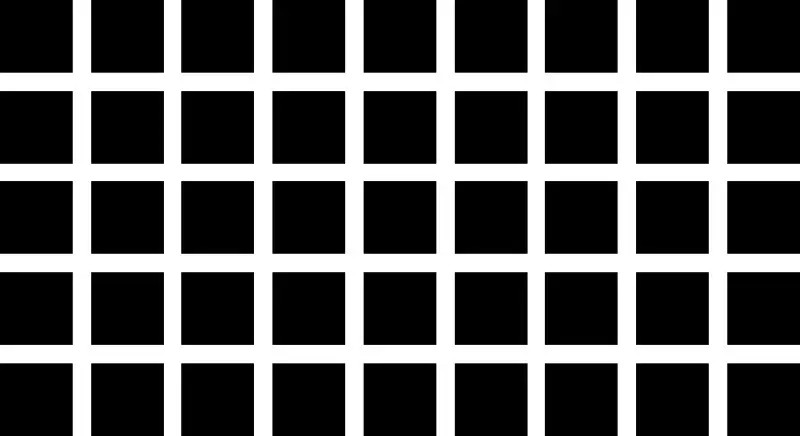
サンプル画像として、有名な錯視「ヘルマン格子」の画像を用意しました。
格子の交差点に灰色の丸い影のようなものが見えますが、ルーペで拡大すると、実際にはそのような模様が描かれていないことがよく分かります。
コード
<!-- 全体を囲むコンテナに touch-action: none を追加して、操作中の意図しないスクロールを防止 -->
<div style="display: block; text-align: center; cursor: crosshair; touch-action: none;">

  <!-- 画像とルーペをひとまとめにするインライン要素 -->
  <span style="position: relative; display: inline-block;">

    <!-- メイン画像 -->
    <img id="target-img" src="画像のURL" alt="画像の説明"
      style="display: block; width: 100%; max-width: 600px; height: auto;">

    <!-- ルーペ本体 -->
    <div id="glass" style="position: absolute;
            border: 3px solid #fff;
            border-radius: 50%;
            width: 150px;
            height: 150px;
            display: none;
            pointer-events: none;
            box-shadow: 0 0 15px rgba(0,0,0,0.5);
            background-repeat: no-repeat;
            background-image: url('画像のURL');
            z-index: 100;">
    </div>

  </span>

</div>

<script>
  (function () {
    const img = document.getElementById('target-img');
    const glass = document.getElementById('glass');
    const zoom = 2; // 拡大倍率

    img.addEventListener('mousemove', moveMagnifier);
    img.addEventListener('touchstart', moveMagnifier, { passive: false });
    img.addEventListener('touchmove', moveMagnifier, { passive: false });
    img.addEventListener('mouseleave', hideGlass);
    img.addEventListener('touchend', hideGlass);

    function hideGlass() { glass.style.display = 'none'; }

    function moveMagnifier(e) {
      // デフォルトのスクロール動作などを防止
      if (e.cancelable) e.preventDefault();
      glass.style.display = 'block';

      const rect = img.getBoundingClientRect();
      let x, y;

      // タッチかマウスかで座標取得を分岐
      if (e.touches && e.touches[0]) {
        x = e.touches[0].clientX - rect.left;
        y = e.touches[0].clientY - rect.top;
      } else {
        x = e.clientX - rect.left;
        y = e.clientY - rect.top;
      }

      // 範囲外なら非表示にする(スマホの画面外スワイプ対策)
      if (x < 0 || y < 0 || x > rect.width || y > rect.height) {
        hideGlass();
        return;
      }

      const w = glass.offsetWidth / 2;
      const h = glass.offsetHeight / 2;

      // 画像の左上(0,0)からの相対座標でセット
      glass.style.left = (x - w) + "px";
      glass.style.top = (y - h) + "px";

      // 背景処理
      glass.style.backgroundSize = (img.width * zoom) + "px " + (img.height * zoom) + "px";
      const posX = (x * zoom) - w;
      const posY = (y * zoom) - h;
      glass.style.backgroundPosition = `-${posX}px -${posY}px`;
    }
  })();
</script>
補足
touch-action: none: スマホで画像をなぞったときに、ルーペのがたつきやページスクロールを防止する。
display: none: マウスが乗るまで非表示
pointer-events: none; マウス操作を透過
即時実行関数(IIFE): スクリプト全体を (function() { ... })(); で囲み、同じページに他のスクリプトがあった場合に、変数名が衝突してエラーになるのを防ぐ。
{passive: false}: スマホのブラウザに対して、preventDefault を使うことを明示的に伝える。
座標取得の共通化: e.touches[0] があればスマホ、なければマウスとして座標を計算するようにして、1つの関数で両方対応できるようにする。
座標計算の微調整: e.clientX(ブラウザの表示領域からの座標)を使用し、スクロールの影響を受けにくくする。